What Is a Media Database? (And Do You Actually Need One?)
What a media database is, what is inside one, how it differs from a media list, monitoring tool or wire service, what Cision, Muck Rack and Meltwater really cost, and when a cheaper or free option is enough.
A media database is a searchable directory of news outlets and the people who work at them, with the contact details you need to pitch a story. You filter it by country, city, topic or outlet type, pick the right reporters or newsrooms, and export them into a media list for one campaign.
That is the whole idea. The hard questions are what you actually get for the money, how the big subscription tools differ from cheaper options, and whether you need one at all. This guide answers those in plain English, with real price data. For context, we run Media PR Database, a one-time-payment media database with 9,596 news outlets in 195 countries and 16,692 newsroom and journalist emails, so we will also be clear about where it fits and where it does not.
What is a media database?
A media database (also called a PR database, media contact database or journalist database) is a structured collection of:
- Outlets: newspapers, news sites, TV and radio stations, magazines, trade publications, and sometimes podcasts and newsletters.
- Contacts: journalists, editors, producers and general newsroom inboxes at those outlets.
- Attributes that let you filter: location, coverage area, topic or beat, outlet type and role.
You use it to answer one question fast: "Who should hear about this story, and how do I reach them?" Without one, you answer it by hand, by visiting outlet websites one by one and copying contact pages into a spreadsheet.
Media database vs. media database software
People use the two terms loosely. Strictly, the database is the data (outlets and contacts). Media database software is the product wrapped around it: search filters, saved lists, email sending, tracking and sometimes monitoring and reports. Enterprise tools such as Cision, Muck Rack and Meltwater sell the software and the data together. Simpler tools sell mainly the data, with search and a CSV export.
What is inside a media database
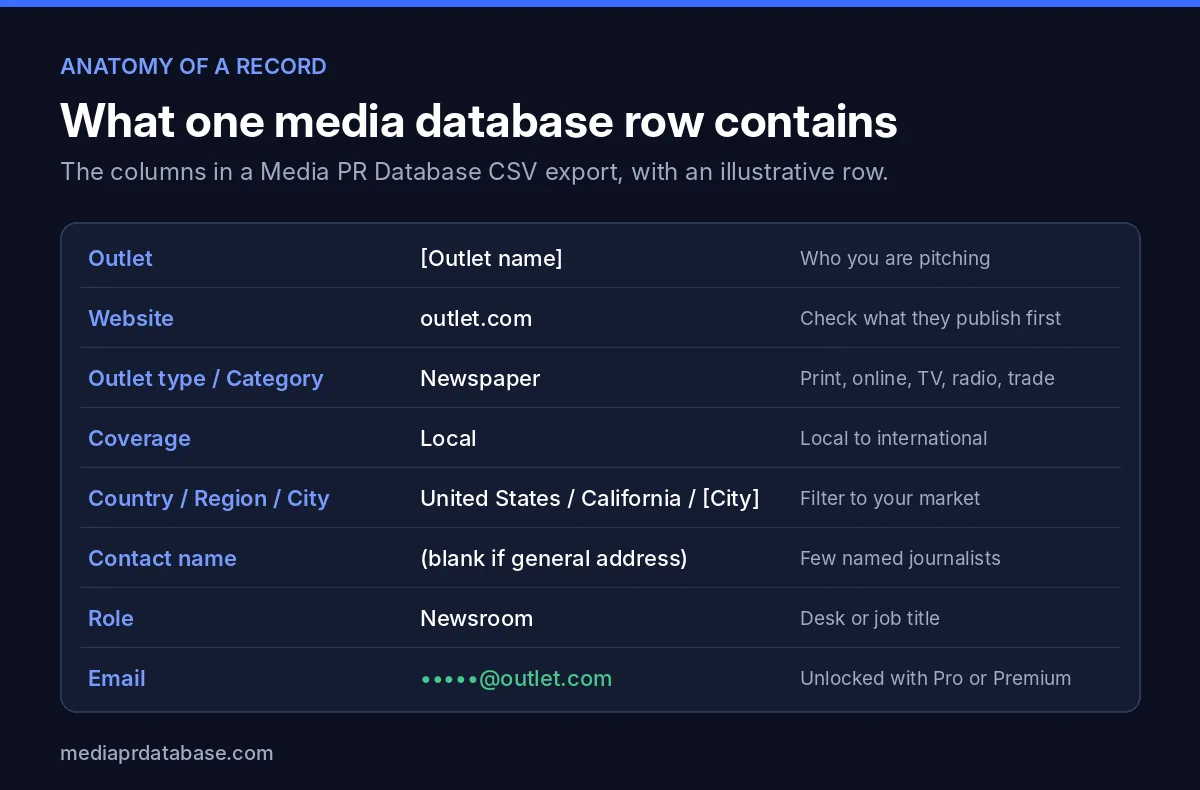
Every media database stores roughly the same things. Here is the actual column structure of our CSV export, which is typical of the category:
| Column | What it tells you | Why it matters |
|---|---|---|
| Outlet | The publication or station name | Who you are pitching |
| Website | The outlet's site | Read recent stories before you pitch |
| Kind | News outlet, podcast or newsletter | Different pitches for different formats |
| Outlet type / Category | Newspaper, online news, TV, radio, magazine, trade | Match the story to the format |
| Coverage | Local, regional, national or international | Local stories need local outlets |
| Continent / Country / Region / City | Where the outlet is based | Filter to your market |
| City size | Size of the outlet's home city | Small-town papers often take more local stories |
| Domain Rating | A rough measure of the site's authority | Useful for prioritising, not for deciding |
| Contact name | A named journalist, when we have one | Personal pitches get read more |
| Role | Newsroom, editor, desk or job title | Send to the right inbox |
| The address to pitch | The reason most people buy a database |
Larger subscription tools add more on top: beats and topics per journalist, recent articles, social profiles, phone numbers, pitching preferences, and notes your team has written. That depth is a big part of what you pay for.
Named journalists vs. general newsroom addresses
This is the biggest quality difference between databases, and it is worth understanding before you buy.
- Named journalist emails (for example a reporter on the health desk) are the most targeted, but they go out of date as people change jobs, and in some regions they count as personal data.
- General newsroom addresses (news desk, tips, editor) are less personal but more stable, and an editor routes them to the right reporter.
Be honest with yourself about which you need. Media PR Database is mostly general newsroom addresses with a smaller number of named journalists. That works well for local, regional and international newsroom outreach. If you need deep beat data on hundreds of named national reporters, an enterprise tool will give you more.
Media database vs. media list, monitoring, wire services and HARO
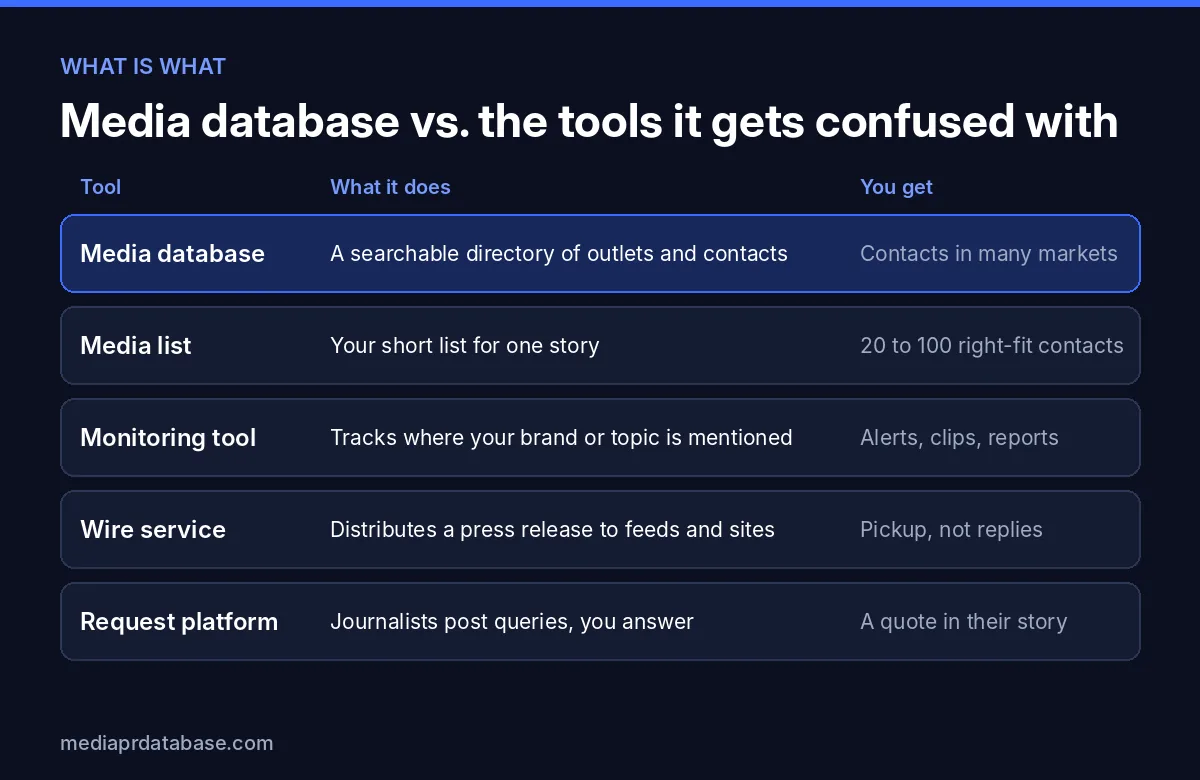
Five kinds of PR tools get mixed up all the time. They solve different problems:
| Tool | What it does | Good for | Not good for |
|---|---|---|---|
| Media database | Searchable directory of outlets and contacts | Finding who to pitch, in any market | Telling you if you got coverage |
| Media list | Your short list for one story | One campaign, one angle | Reuse across very different stories |
| Monitoring tool | Tracks mentions of your brand or topic | Measuring coverage, spotting trends | Finding contacts to pitch |
| Wire service | Distributes a press release to feeds and sites | Official announcements, SEO pickup | Building relationships with reporters |
| Request platform (HARO type) | Journalists post queries, sources reply | Expert quotes in other people's stories | Pitching your own story |
Media database vs. media list
A media list is the output; the database is the source. You build a list of 20 to 100 right-fit contacts for one story from a database of thousands. You can try this for free with our free media list builder, which turns a topic and location into a starter list.
Media database vs. media monitoring
Monitoring tools watch news, broadcast and social media for mentions. Many enterprise suites bundle monitoring and a database, which is one reason they cost so much. If you only need contacts, you are paying for a module you will not use. Our Meltwater alternatives guide covers this split in detail.
Media database vs. wire services
A wire service sends your release out widely, but nobody on the other side asked for it, and most pickups are automated reposts. A database lets you send a short, personal pitch to the few newsrooms that would actually cover the story.
Media database vs. HARO and request platforms
Request platforms flip the direction: reporters post what they need and you respond. They are great for expert commentary, but you cannot use them to pitch your own news. See our HARO alternatives roundup for the current options.
Who needs a media database (and who does not)
You probably need one if you are
- A freelance PR consultant pitching several clients in different industries or cities each month.
- A small agency that needs fresh lists for new clients without paying five figures a year.
- A startup or small business launching in several markets, or reaching local press in many towns at once.
- A marketer doing digital PR who sends data stories to dozens of outlets per campaign.
- Anyone pitching internationally, where finding newsroom contacts by hand is slow and language-dependent.
You probably do not need one if you
- Pitch a handful of outlets you already know. A spreadsheet and the outlets' contact pages are enough.
- Only want expert quotes. Request platforms are a better fit.
- Need monitoring and reporting more than contacts. Buy a monitoring tool, not a database.
- Have one local story in one town. You can find local newspapers for free and pitch them directly.
How much does a media database cost?
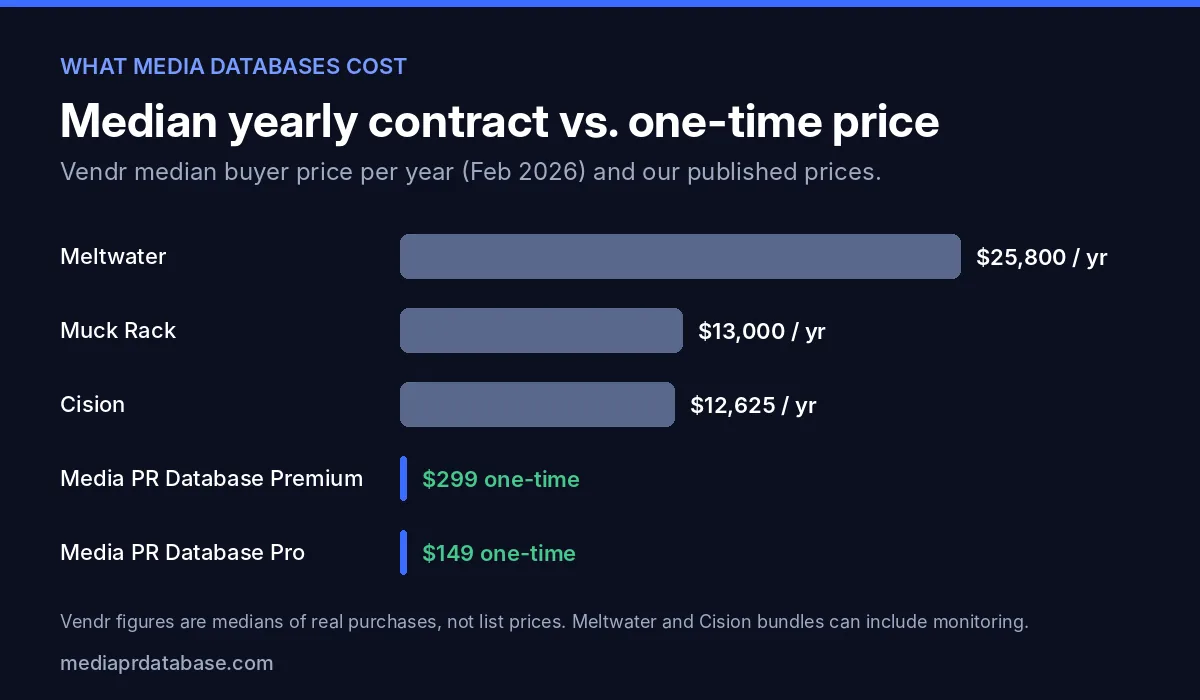
The big three do not publish prices. The most useful public data comes from Vendr, a software buying platform that reports what its customers actually paid. Here is what it shows:
| Tool | Median paid per year | Range of purchases | Small teams (1 to 5 users) |
|---|---|---|---|
| Meltwater | $25,800 | $5,375 to $56,993 (126 purchases) | $15,000 to $30,000 for single-region monitoring |
| Muck Rack | $13,000 | $8,000 to $20,860 (80 purchases) | $10,000 to $25,000 |
| Cision | $12,625 | $3,150 to $30,368 (107 purchases) | $15,000 to $40,000 |
| Media PR Database | $149 or $299 one-time | Two published plans | Same price for any team size |
Sources: Vendr, Meltwater pricing; Vendr, Muck Rack pricing; Vendr, Cision pricing.
What drives the price up
Vendr's guides list the same cost drivers for all three tools:
- Seats. Pricing scales with the number of users.
- Modules. Cision sells its media database, monitoring, PR Newswire distribution and analytics as separate products. Vendr puts the Cision Media Database alone at $10,000 to $25,000 a year for one to three users with North America coverage, and Meltwater's media contacts module at $5,000 to $15,000 a year when added to a contract.
- Geography. Global coverage costs more than one region.
- Onboarding. Vendr reports onboarding and training fees of $1,000 to $5,000 for Muck Rack and $2,000 to $10,000 for Cision and Meltwater.
- Renewals. Vendr reports yearly price increases of 3% to 7% on Cision and Meltwater contracts and 5% to 15% at Muck Rack renewals, plus auto-renewal clauses.
Those tools do a lot more than list contacts, so the comparison is not apples to apples. But if contacts are what you need, it is worth knowing what share of the bill they are. Our Cision alternatives and Muck Rack alternatives guides compare cheaper options side by side.
Subscription vs. one-time payment
Most media databases are annual subscriptions. A few, including ours, charge once.
| Annual subscription | One-time payment | |
|---|---|---|
| Typical buyer | In-house PR teams, larger agencies | Freelancers, small agencies, founders |
| Contract | Usually 12 months, often auto-renews | No contract, no renewal |
| Features | Database plus monitoring, CRM, reports | Mostly the data, search and export |
| Data depth | Usually more named journalists and beats | Varies; check before you buy |
| Budget risk | Price rises at renewal | Known cost up front |
A subscription makes sense when you pitch every week, need monitoring and reports, and have the budget. A one-time database makes sense when you pitch in bursts, mostly need emails and want a predictable cost.
How to evaluate a media database before you buy
Use these five checks on any tool, including ours.
1. Coverage
- Does it cover the countries, states and cities you pitch? Search a few small towns, not only big cities.
- Does it include the outlet types you need: local papers, TV, radio, trade press, podcasts, newsletters?
- Can you see outlet counts per location before paying? On our site, search is free and shows every outlet; only emails are hidden. Try the media database search, or browse newspapers in California, the Canada media list or the Australia media list.
2. Freshness
- Ask how contacts are collected and how often they are checked.
- Prefer sources you can verify, such as the outlet's own contact and staff pages. Ours come from outlets' public websites; we do not buy lists or guess addresses.
- Test a sample: send to ten contacts and count the bounces.
3. GDPR and privacy
- Under the GDPR, information about an identified person, including a named work email, is personal data. That affects how named journalist emails in the EU and EEA can be stored and used.
- Ask the vendor how it handles EU and EEA contacts. We list only one general role address per outlet in the EU and EEA, never personal addresses.
- Whatever tool you use, pitch one person at a time, keep it relevant and honour opt-outs.
4. Export
- Can you download a CSV, or are you locked into the vendor's email tool?
- Does the export work with your sending tool? Media PR Database Premium exports ready-made files for Instantly, Smartlead and Lemlist.
5. Price and terms
- Is the price published, or do you need a sales call?
- Is there a minimum term, auto-renewal or a yearly increase?
- What do you lose access to when you stop paying?
Free media database options and their limits
"Free media database" is a popular search, and there are real free options. They all have limits.
| Free option | What you get | The limit |
|---|---|---|
| Outlet websites | Contact, about and staff pages | Slow: one outlet at a time |
| Journalist bylines and social profiles | Who covers what, from their recent stories | Emails often not listed |
| Request platforms (HARO type) | Journalist queries by email | You answer, you cannot pitch |
| Free trials of paid tools | Full features for a short time | Often need a sales call; exports may be limited |
| Our free tools | Media list builder, local news finder, free outlet search | Outlet names and details are free; emails need a paid plan |
Free works if you pitch rarely and to a small set of outlets. Once you pitch many markets or many stories, the time spent copying contact pages is usually worth more than a one-time database.
How to build a media list from a media database
The database is only useful if you turn it into a short, relevant list. Here is the process we recommend.
- Write the story in one sentence. Who is it about, what happened, and why would readers care now? If you cannot write it, no list will help.
- Decide where the story matters. Local (one city or state), national, international, or a specific industry.
- Filter by location and coverage. For a local story, filter by city and region and keep local and regional coverage only.
- Filter by outlet type. Newspapers and online news for written stories, TV for visual ones, trade press for B2B, podcasts for founder interviews.
- Check each outlet's website. Spend 30 seconds per outlet on recent stories. Remove any that never cover your topic.
- Pick the right inbox. Use a named journalist when you have one who covers the topic; otherwise use the news desk or editor address.
- Keep it short. 20 to 100 contacts that fit beats 2,000 that do not.
- Export and personalise. Download the CSV, add a column for a personal first line, and send one-to-one emails, not a blast.
- Write the pitch. Start from our media pitch email template or draft one with the free media pitch generator.
- Follow up once, then log results. Note who replied and who covered it, so your next list is better.
Want a head start? The free media list builder does steps 2 to 4 for you and gives you a starter list to refine.
Where Media PR Database fits
We built Media PR Database for people who need contacts, not a full PR suite, and do not want an annual contract. Here is what it is and is not.
What you get
- 9,596 news outlets in 195 countries, including all 50 US states.
- 16,692 newsroom and journalist emails, collected from the outlets' own public websites.
- Pro, $149 one-time: news outlet emails and CSV export.
- Premium, $299 one-time: everything in Pro, plus 2,997 podcasts and 123 newsletters, and export to Instantly, Smartlead and Lemlist.
- No subscription, no auto-renewal and no sales call. Each plan includes 12 months of access.
What it is not
- Not a monitoring tool. It will not tell you where you were mentioned.
- Not deep beat data. Most contacts are general newsroom addresses, with fewer named journalists than enterprise tools.
- EU and EEA are general addresses only. One role address per outlet, for GDPR reasons.
If that matches what you need, compare plans on the pricing page. If you need monitoring, deep journalist profiles and team workflows, a subscription tool is the better choice, and our alternatives guides will help you pick one.
The bottom line
A media database is a directory of outlets and contacts that turns "who should I pitch?" into a filter and an export. You need one if you pitch often, across many markets, or on behalf of clients. You probably do not if you pitch a few outlets you already know.
Enterprise suites bundle the database with monitoring and reports, and real buyers pay a median of $12,625 to $25,800 a year for them. If you mainly need contacts, a one-time database or free tools may be enough. Either way, the result that matters is a short, relevant media list and a pitch written for one reader. Start with the free media list builder and see what your market looks like.
FAQ
What is a media database?
A media database is a searchable directory of news outlets and the journalists, editors and newsroom inboxes at them, with contact details. PR people, founders and marketers filter it by location, topic and outlet type to build media lists and pitch stories.
What is the difference between a media database and a media list?
A media database is the full directory, often thousands of outlets. A media list is the short list of 20 to 100 right-fit contacts you build from it for one story or campaign.
How much does a media database cost?
Enterprise tools do not publish prices. Vendr's buyer data shows median yearly contracts of $25,800 for Meltwater, $13,000 for Muck Rack and $12,625 for Cision. Media PR Database costs $149 (Pro) or $299 (Premium) one-time, with no subscription.
Is there a free media database?
There is no complete free media database, but you can combine free sources: outlet contact pages, journalist bylines, request platforms such as HARO, free trials and free tools like the Media PR Database media list builder and outlet search. The limit is time, since you collect contacts by hand.
Is a media database legal under GDPR?
Using one can be, but named work emails of people in the EU and EEA count as personal data under the GDPR, so they need care. Media PR Database lists only one general role address per outlet in the EU and EEA, never personal addresses. Always pitch one person at a time and honour opt-outs.
Do I need a media database for a small business?
Not always. If you pitch a few local outlets you already know, a spreadsheet is enough. A database helps when you pitch many cities or countries, several stories a year, or on behalf of clients.
Build your media list in minutes
Search free, then download any country or state list as CSV in one click.
Keep reading
Press Release Boilerplate: 30 Examples to Copy (and a Simple Formula)
Press release boilerplate guide: what the About section is, where it goes, a 5-part fill-in formula, length data from 15 real releases, 15 real boilerplate examples with sources and 15 templates by company type.
PitchingMedia Pitch Email Template: Copy, Paste and Get Replies (2026)
A media pitch email template broken down line by line, plus 8 copy-paste variants, 30+ subject line examples, follow-up rules and the mistakes journalists hate.
Pitching17 Media Pitch Samples by Industry (Tech, Food, Health, Local, B2B)
17 copy-paste media pitch samples by industry: tech launch, food, health, local business, B2B data, expert source, event, podcast, newsletter and follow-up, with subject lines and why each works.