What Is a Media List? Definition, Example and Free Template
What a media list is, the nine columns every media list needs, a real example with masked emails, a copy-paste media list template, how to build a media list in one hour, how many outlets to include and how to keep it clean.
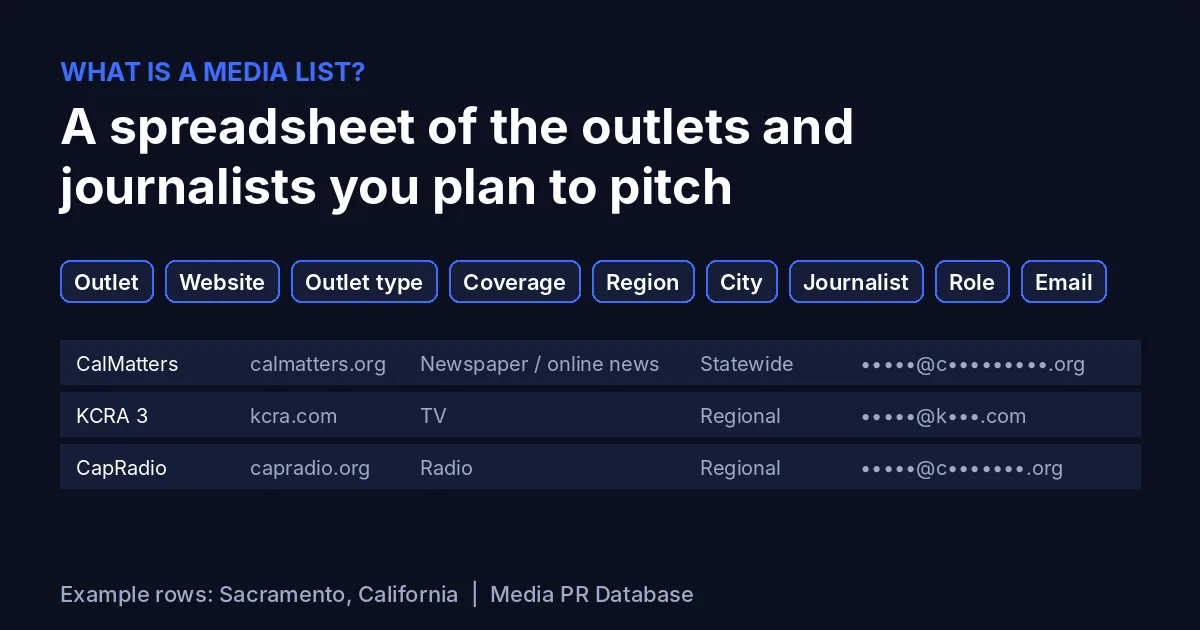
Short answer: a media list is a spreadsheet of the specific outlets and journalists you plan to pitch for one story or campaign. Each row is one contact at one outlet, and the columns tell you who they are, what they cover, where they are and how to reach them: Outlet, Website, Outlet type, Coverage, Region, City, Journalist, Role and Email. A good media list is short, matched to the story, and checked before you hit send.
This guide explains what goes into a media list, shows a real example built from public outlet data, gives you a free media list template you can paste into Google Sheets or Excel, and walks through how to build a media list in about an hour. It comes from Media PR Database, a directory of 9,596 news outlets in 195 countries with 16,692 newsroom and journalist emails, so building media lists is what we do every day.
What is a media list?
A media list (also called a press list or PR list) is a working document that answers one question: who should hear about this story? It lists the newspapers, news sites, TV and radio stations, magazines, trade publications and, sometimes, podcasts and newsletters that are likely to care, together with the right person or inbox at each one.
Three things make it a media list rather than just a list of email addresses:
- It is built for a story. A restaurant opening in Sacramento and a fintech funding round need completely different lists, even if both come from the same company.
- It has context. Outlet type, coverage area and the journalist's role tell you why each contact is on the list, so you can tailor the pitch.
- It is maintained. Journalists change jobs, newsrooms change inboxes and outlets close. A media list gets updated after every send.
PR agencies, in-house communications teams, founders and small business owners all use media lists. The format is the same whether you pitch five local outlets or 150 national ones.
What columns does a media list have?
You can track dozens of fields, but nine columns cover almost every pitch. These are the core columns of the Media PR Database CSV export, and they work just as well in a list you build by hand.
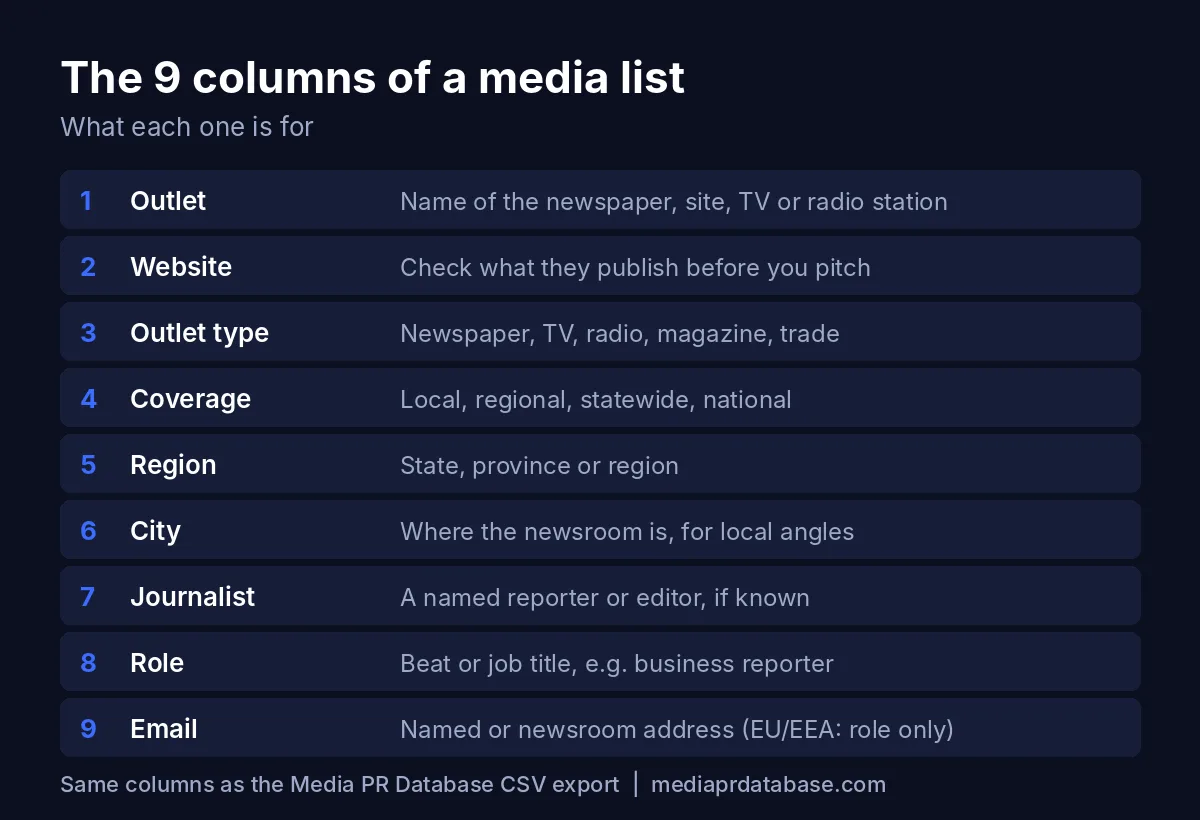
| Column | What goes in it | Why it matters |
|---|---|---|
| Outlet | The publication or station name, e.g. CalMatters | Lets you sort, group and avoid pitching the same outlet twice |
| Website | The outlet's home page | You read recent stories here before you pitch |
| Outlet type | Newspaper / online news, TV, Radio, Magazine, trade | Decides the angle: TV wants visuals, trade titles want industry detail |
| Coverage | Local, Regional, Statewide, National, International | Stops you sending a neighbourhood story to a national desk |
| Region | State, province or region | Lets you filter for regional and statewide stories |
| City | Where the newsroom is based | The key filter for any local angle |
| Journalist | A named reporter, editor or producer, if you have one | Personal pitches beat generic ones |
| Role | Beat or job title, e.g. business reporter, news desk | Confirms the person actually covers your topic |
| A named work address or the newsroom address | How the pitch reaches them |
Optional columns worth adding
Once the nine core columns are in place, add tracking columns on the right so the list doubles as a log:
- Tier (A, B or C), so you know who gets a personal note first.
- Last story: a link to something they wrote recently on your topic.
- Date pitched and Follow-up date.
- Status: sent, replied, interested, covered, declined, bounced.
- Notes: preferences such as "no attachments" or "pitch before 10 a.m."
Our full export also includes data such as continent, country, city size, a Domain Rank score and estimated monthly organic traffic, which help when you want to sort a long list by reach.
Media list example (real outlets, masked emails)
Here is a real media list example for a story about a new business opening in Sacramento, California. We ran the free media list builder for Sacramento on October 30, 2026, and it returned six outlets. Emails are masked here the same way they are in the free tool; the Journalist and Role cells are left empty because the free preview shows only newsroom-level data, and filling them in is your job in step 4 below.
| Outlet | Website | Outlet type | Coverage | Region | City | Journalist | Role | |
|---|---|---|---|---|---|---|---|---|
| CalMatters | calmatters.org | Newspaper / online news | Statewide | California | Sacramento | •••••@c•••••••••.org | ||
| KCRA 3 | kcra.com | TV | Regional | California | Sacramento | •••••@k•••.com | ||
| FOX40 | fox40.com | TV | Regional | California | Sacramento | •••••@f••••.com | ||
| ABC10 | abc10.com | TV | Regional | California | Sacramento | •••••@a••••.com | ||
| CapRadio | capradio.org | Radio | Regional | California | Sacramento | •••••@c•••••••.org | ||
| Inside Sacramento | insidesacramento.com | Magazine | Local | California | Sacramento | •••••@i•••••••••••••••.com |
How to read this example
- Mix of formats. One online news outlet, three TV stations, one radio station and one local magazine. A store opening with something to film suits the TV stations; a story with a policy or economic angle suits CalMatters, which covers the whole state.
- Coverage tells you the angle. Inside Sacramento is local, so it wants the neighbourhood detail. The TV stations are regional, so they need a reason viewers outside the city would care.
- Six is a realistic local list. A city-level search rarely returns hundreds of outlets. For Sacramento you would then widen to the rest of California, which has 239 outlets in our database, and keep only those that match the story. Browse them on the California media list page.
Free media list template (copy and paste)
Copy the block below, paste it into cell A1 of a new Google Sheet or Excel workbook, and it splits into columns automatically (the values are separated by tabs). The first row is the header; the second is a sample row you can overwrite.
Outlet	Website	Outlet type	Coverage	Region	City	Journalist	Role	Email	Tier	Last story	Date pitched	Follow-up date	Status	Notes
Example Daily News	example.com	Newspaper / online news	Local	Example State	Example City	Jane Doe	Business reporter	newsroom@example.com	A	link to a recent story	2026-11-03	2026-11-06	Sent	Prefers short pitches
Or, if you prefer to see it as a table:
| Outlet | Website | Outlet type | Coverage | Region | City | Journalist | Role | Tier | Status | |
|---|---|---|---|---|---|---|---|---|---|---|
| Example Daily News | example.com | Newspaper / online news | Local | Example State | Example City | Jane Doe | Business reporter | newsroom@example.com | A | Sent |
The sample row uses a made-up outlet and address on purpose. Replace it with real contacts.
Template tips
- Freeze the header row and turn on filters, so you can sort by Coverage or Tier in one click.
- Use a drop-down for Status (data validation in Sheets or Excel) so the values stay consistent.
- Keep one row per contact. If an outlet has two reporters on your beat, give each a row and repeat the outlet details.
- Make a copy per campaign. Keep a master list, then duplicate and trim it for each story.
How to build a media list in one hour
You do not need a week or an expensive subscription to build a solid media list. Here is the process we use, with rough timings.
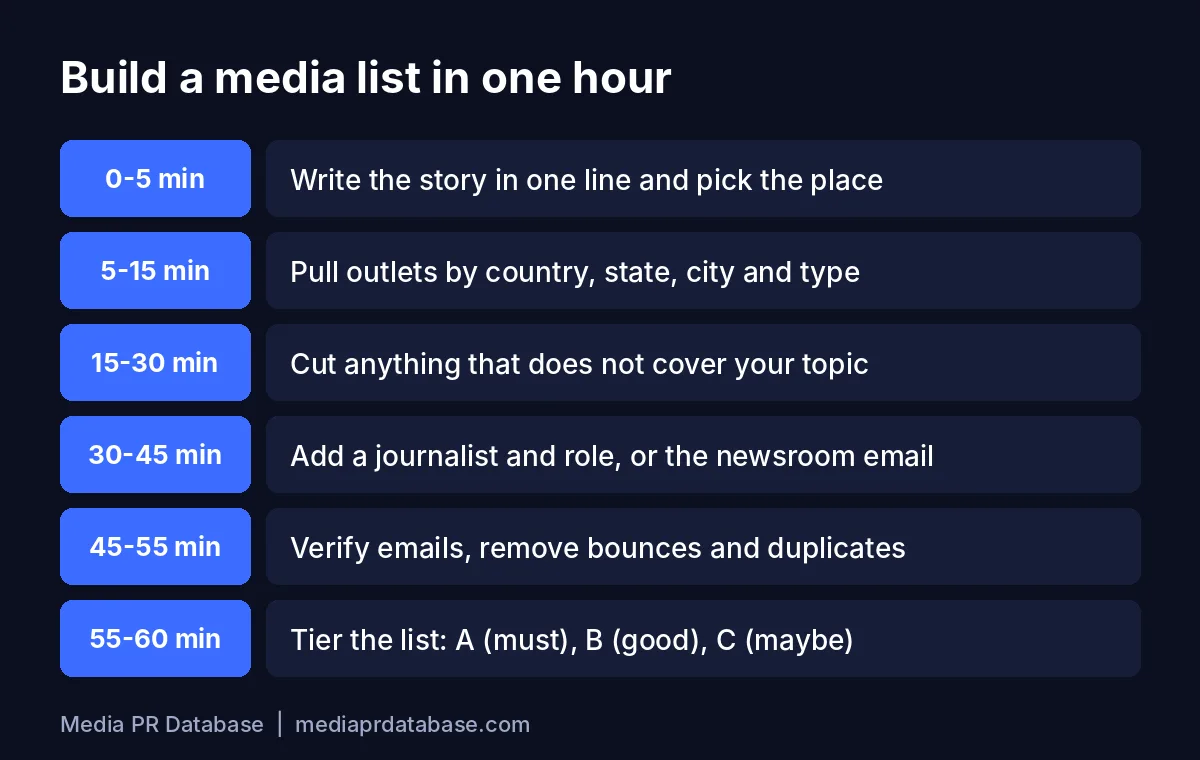
Step 1: Write the story in one line (5 minutes)
Before you collect a single contact, write down what the story is, who it matters to and where. "Family bakery opens second location in Sacramento and hires 12 people" tells you instantly that you need local and regional outlets in Northern California, with food, business and community reporters. If you cannot write the one-liner, the list will be unfocused too.
Step 2: Pull outlets by place and type (10 minutes)
Open the free media list builder, choose the country, then the state or region and city, and filter by outlet type and coverage. It shows how many outlets match and previews them with their websites, and you can copy the preview straight into Google Sheets. For a purely local story, the Local News Finder groups the same data into newspapers, TV and radio for one city. For a country-wide view, start from a country page such as the UK media list or the Australia media list.
Step 3: Cut anything off-topic (15 minutes)
Open each outlet's website and skim the last few weeks of stories. If they never cover your subject, delete the row. This is the step most people skip, and it is the one that matters most: in Muck Rack's State of Journalism 2026 survey, 43% of journalists said it was rare to get pitches relevant to their beats, and the thing journalists valued most in a pitch was clear relevance to their beat (70%) (University of Minnesota summary of the report).
Step 4: Add the right person (15 minutes)
For each outlet that survives, find the reporter or editor who covers your topic. Look at bylines on related stories, the outlet's staff or contact page, and the author's profile. Note their name and role. If no one obviously fits, use the newsroom or news desk address instead: an editor there will forward a good story, and a general desk address is better than a named contact who covers something else.
Step 5: Verify emails and remove duplicates (10 minutes)
Run the email column through an email verification service, remove addresses that come back invalid, and de-duplicate the sheet (in Google Sheets: Data, then Data cleanup, then Remove duplicates). Sending to dead addresses hurts your sender reputation and can push your next pitch into spam.
Step 6: Tier the list (5 minutes)
Mark each row A, B or C. A contacts are perfect fits who get a fully personal email. B contacts get a lightly personalised version. C contacts are "maybe" outlets you contact only if the story lands well with the first two tiers. Then write the pitch: our media pitch email template and the media pitch generator help you keep it short.
How many outlets should a media list include?
There is no official number, but there is a clear principle: relevance beats size. A list of 30 outlets that all cover your topic will get more replies than 3,000 that mostly do not. These are the ranges we suggest as a starting point:
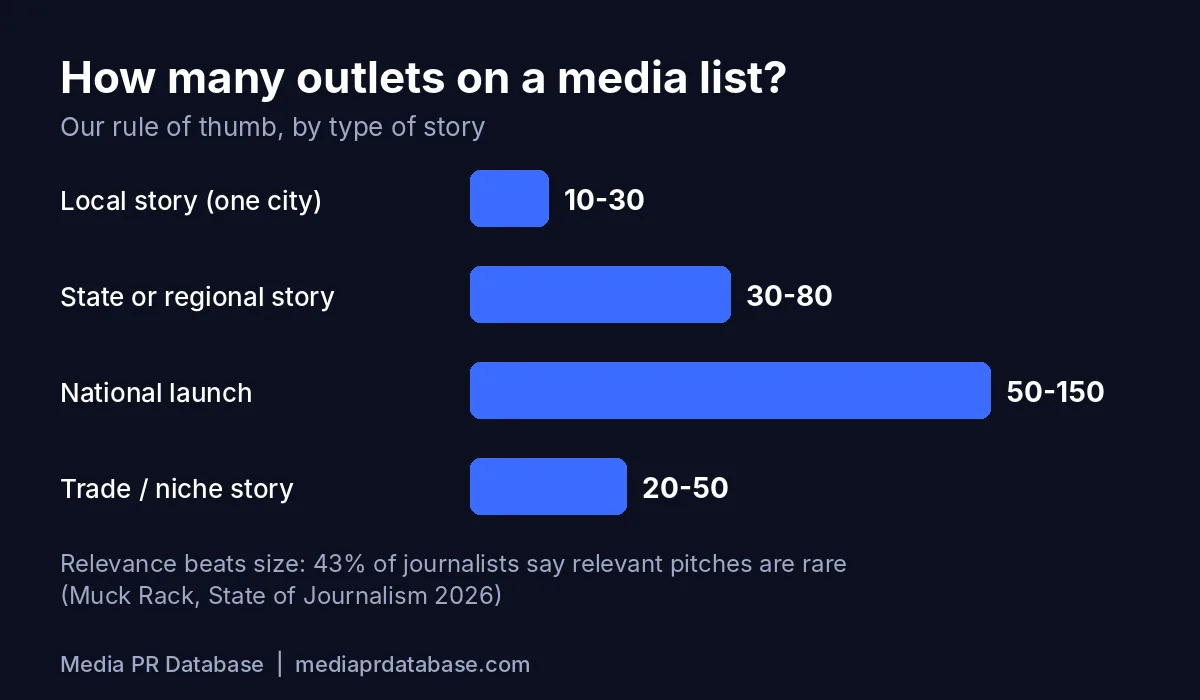
| Type of story | Suggested size | Where to start |
|---|---|---|
| Local (one city or town) | 10 to 30 outlets | City search in the Local News Finder |
| State or regional | 30 to 80 outlets | A state page such as California |
| National launch | 50 to 150 outlets | National coverage filter in the media list builder |
| Trade or niche | 20 to 50 outlets | Trade titles plus a few general business desks |
If your list is far bigger than these ranges, it usually means the story is not defined tightly enough (go back to step 1) or you have not cut off-topic outlets (step 3). If it is much smaller, widen the geography one level: city to state, state to country.
How to keep a media list clean
A media list starts going stale the day you build it. A few habits keep it useful.
Handle bounces straight away
- Hard bounces (address does not exist): delete the email, mark the row "bounced", and look for the person's new outlet or the newsroom's current address.
- Soft bounces (full inbox, temporary error): keep the row, try once more later, and remove it if it bounces again.
- Auto-replies saying someone has left: update the row the same day. These replies often name the replacement.
Re-check before every campaign
Before you reuse a list, re-verify the emails and spot-check the A tier: is each person still at the outlet and still on the same beat? It takes ten minutes and saves embarrassing "she left in March" replies.
Respect opt-outs
If a journalist asks not to be contacted, remove them from every copy of the list and keep a separate "do not contact" sheet so they are not added back later. Laws such as CAN-SPAM in the US and the GDPR in Europe expect you to honour these requests.
GDPR: EU and EEA outlets
Under the GDPR, information about an identified person, including a named work email such as firstname.lastname@outlet.eu, is personal data. That is why, for outlets in the EU and EEA, Media PR Database lists only general role addresses (for example a newsroom or editorial desk inbox), one per outlet, and no personal addresses. If you add named EU contacts to your own list, keep only what you need, pitch only relevant stories, and remove people who ask. This is general information, not legal advice.
Keep notes after every send
Who replied, who covered the story, who said "not for us but try me on X". That history is what turns a media list into a list of relationships.
Media list vs media database
People often use the two terms interchangeably, but they are different things:
| Media list | Media database | |
|---|---|---|
| What it is | A short, curated spreadsheet for one story or campaign | A large, searchable directory of outlets and contacts |
| Size | Usually 10 to 150 rows | Thousands of outlets |
| Who maintains it | You | The provider |
| Lifespan | One campaign, then updated or archived | Ongoing |
| Relationship | Built from a database plus your own research | The source you pull lists from |
In short, the database is the library and the media list is the handful of books you take home for this project. Read what a media database is for the full comparison, including what the big subscription tools cost, and our roundup of Muck Rack alternatives if you are weighing a paid tool.
Common media list mistakes
- One list for every story. A list built for a product launch will not suit a local hiring story.
- Too many outlets. Bigger lists mean less personalisation and more ignored emails.
- No context columns. Without outlet type, coverage and role you cannot tailor the pitch.
- Never checking bounces. Dead addresses damage your sender reputation over time.
- Mass sends with everyone in CC. According to the same Muck Rack summary, 62% of journalists prefer to be pitched in a one-to-one email, so send individually.
- Long pitches. 69% of journalists prefer pitches under 200 words (UMN summary of Muck Rack's State of Journalism 2026).
- Ignoring timing. The same summary reports that 78% of journalists prefer pitches sent before noon.
Where to get a media list
You have three realistic options:
- Build it by hand from outlet websites, mastheads and bylines. Free, but slow for anything beyond a handful of outlets.
- Use a free tool to find the outlets, then add contacts yourself. The media list builder and Local News Finder are free and need no signup.
- Download a ready list with emails. Media PR Database covers 9,596 news outlets in 195 countries with 16,692 newsroom and journalist emails, including outlets in all 50 US states. Pro ($149, one-time) unlocks emails and CSV export in the same columns as the template above. Premium ($299, one-time) adds 2,997 podcasts and 123 newsletters as a bonus. There is no subscription. See pricing.
Good starting points: the California media list, the United Kingdom media list and the Australia media list.
Sources
We checked these on October 30, 2026.
- University of Minnesota University Marketing Communications, "Pitching journalists with Muck Rack's The State of Journalism 2026" (April 13, 2026): 86% of journalists say some of their work began with a PR pitch; 43% say relevant pitches are rare; journalists value relevance to their beat (70%), interview access (58%), original data (40%) and high-resolution images (37%); 62% prefer one-to-one email; 78% prefer pitches before noon; 69% prefer pitches under 200 words.
- Muck Rack, The State of Journalism: the original report.
- GDPR Article 4, definitions: personal data.
- Media PR Database free media list builder, Sacramento and California searches run on October 30, 2026: outlet names, websites, types, coverage and masked emails in the example above.
The bottom line
A media list is a short, story-specific spreadsheet of outlets and journalists, with nine core columns: Outlet, Website, Outlet type, Coverage, Region, City, Journalist, Role and Email. Build it from the story outward, cut every outlet that does not cover your topic, add the right person or the newsroom desk, verify the emails, and tier the list before you pitch. Copy the template above, then run the free media list builder for your city or state to fill the first rows in minutes.
FAQ
What is a media list?
A media list is a spreadsheet of the outlets and journalists you plan to pitch for a specific story or campaign. Each row is one contact, with columns such as Outlet, Website, Outlet type, Coverage, Region, City, Journalist, Role and Email.
What should a media list template include?
At minimum the outlet name, website, outlet type, coverage (local, regional, national), region, city, journalist name, role and email. Add tracking columns for tier, last story, date pitched, follow-up date, status and notes.
How do I build a media list for free?
Write your story in one line, use a free tool such as the Media PR Database media list builder to find outlets by country, state, city and type, cut outlets that do not cover your topic, add the right reporter from bylines or use the newsroom address, verify the emails and tier the list.
How many contacts should be on a media list?
Fewer than most people think. As a rule of thumb, 10 to 30 outlets for a local story, 30 to 80 for a state or regional story, 50 to 150 for a national launch and 20 to 50 for a trade story. Relevance matters more than size.
What is the difference between a media list and a media database?
A media database is a large, searchable directory of outlets and contacts maintained by a provider. A media list is the short, curated selection you pull from it, plus your own research, for one story or campaign.
Can I put EU journalists' emails on a media list?
Named work emails of people in the EU and EEA are personal data under the GDPR, so handle them with care: keep only what you need, pitch relevant stories and remove anyone who asks. For EU and EEA outlets, Media PR Database lists only one general role address per outlet, such as the newsroom inbox.
Build your media list in minutes
Search free, then download any country or state list as CSV in one click.
Keep reading
Free Media Databases: What You Really Get for $0
An honest guide to every free media database option: free trials of paid PR tools, free journalist request services, DIY sources like Google News and mastheads, and free media list tools. What you get, the limits, the time cost, and when paying makes sense.
Media listsWhat Is a Media Database? (And Do You Actually Need One?)
What a media database is, what is inside one, how it differs from a media list, monitoring tool or wire service, what Cision, Muck Rack and Meltwater really cost, and when a cheaper or free option is enough.
PR toolsPR Database Software: One-Time vs Subscription
PR database software compared by pricing model: subscriptions with annual contracts and quote-only pricing, one-time plans from $149, pay-per-use wire packages and free options, with a 12 and 24 month cost table built from published prices.